# Fundamentals of Nodejs
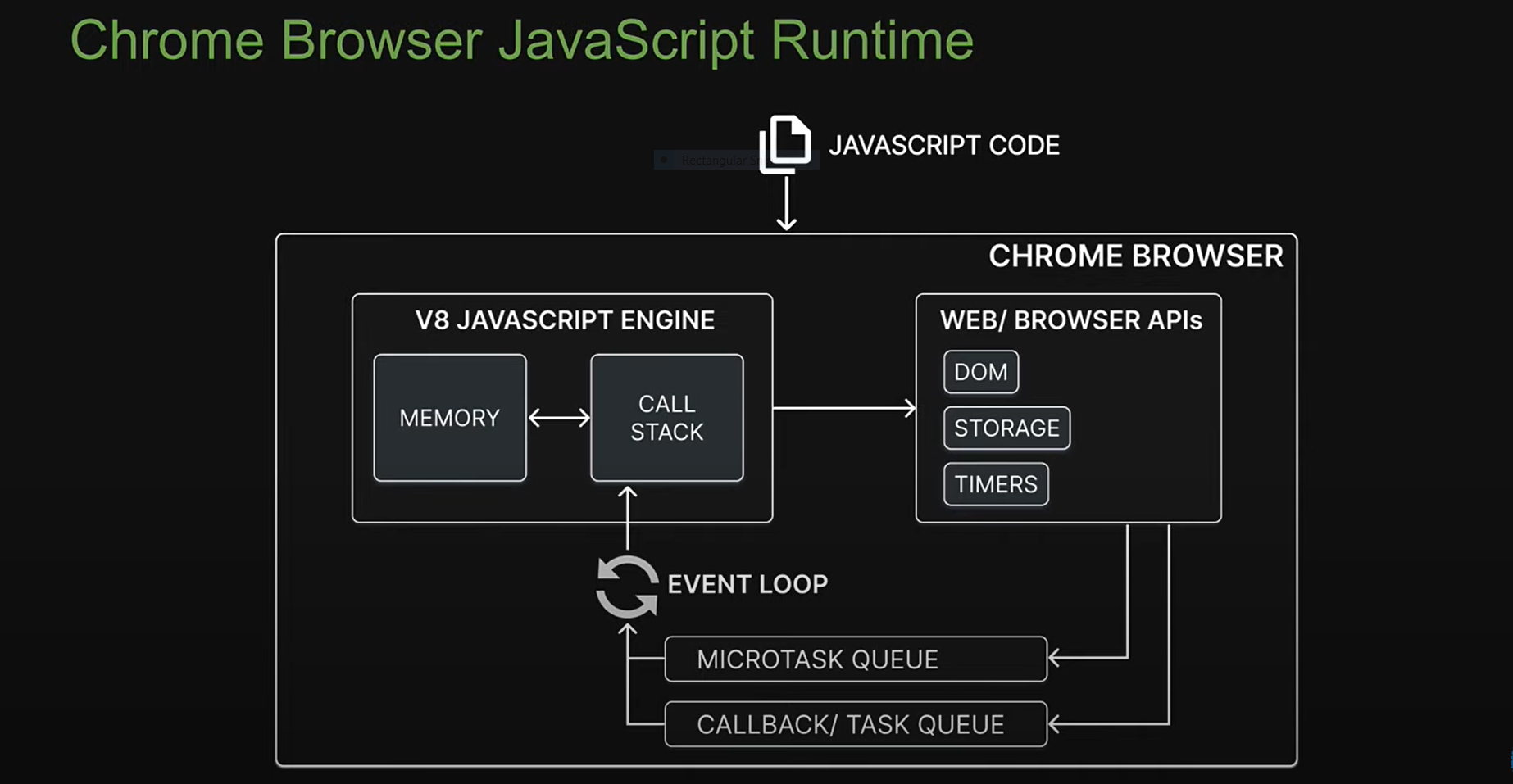
# JavaScript Runtime
# Browser
- V8 engine run using C++
- memory
- call stack
- Web Browser API (this is not javascript)
- Timer
- DOM
- Storage
- Microtask queue
- Call back / task queue
- Event loop
# What is Nodejs ?
- Open source : share and modification
- Cross platform : Mac, window, linux
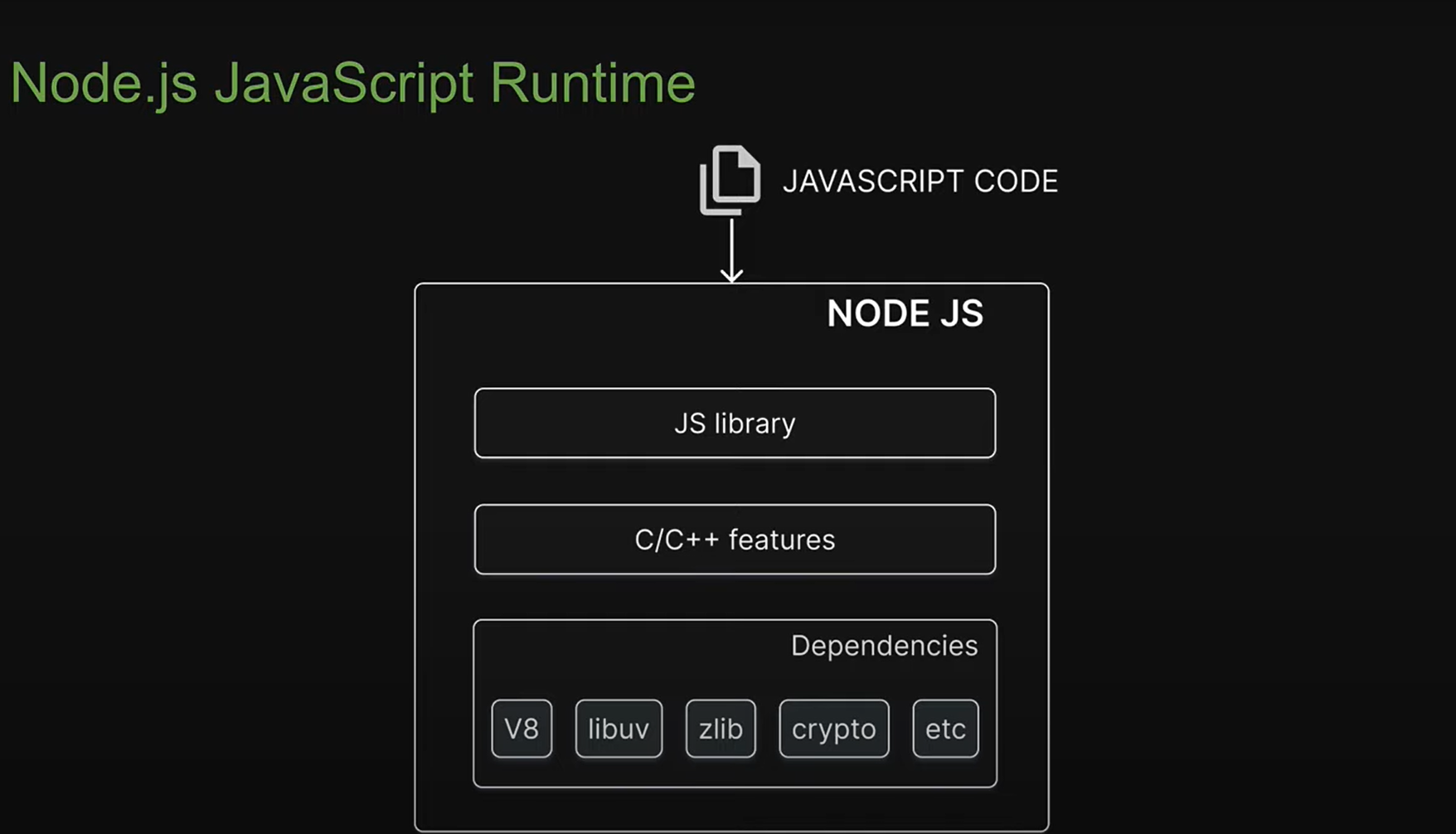
- JavaScript runtime enviroment : provide all necessary components in order to use and run a javascript program
outside the browser - It is not language, it is not a framework
# Build with Nodejs
- Traditional website
- Backend Service
- Run-time applications
- Streming services
- CLI tools
- Multiplayers games
# Deps
External code that node required for functioning
- V8
- UV : libuv (file system and networking)
- Zlib
- crypto
# C++ feature
javascript not design for low level functionality file system and networking that why C++ feature added.
# Js library
node/lib/fs.js is javascript code internally access C++ feature using libuv
Nodejs dont have Web api and DOM (No window or document) like Javascript;
# Modules
A module is encapsulated and reusable chuck of code that its Type of modules
- Local modules : we create in application
- Build-in modules : nodejs ship with out of the box
- Third party modules
# Local modules
- Each file is a module that is isolated by default
- To load a module into another file, we use the require function
- Module exports Default export can be rename Or send object with predefined exports names
- Module scope
- Each loaded module in nodejs is wrapped with an IIFE that provides prive scoping of code
- IIFE allows you to repeat variable or function names with any conflicts
- Module Wrapper
- IIFE that wraps every module contains % parameters which are pretty important for the functioning of module
// index.js
(function(){
    const superHero = 'Batman';
    console.log(superHero)
})
// index.js after runing in node js
(function(exports, require , module, __filename, __dirname){
    // this how 'exports, require , module, __filename, __dirname' is accessable in files
    const superHero = 'Batman';
    console.log(superHero)
})
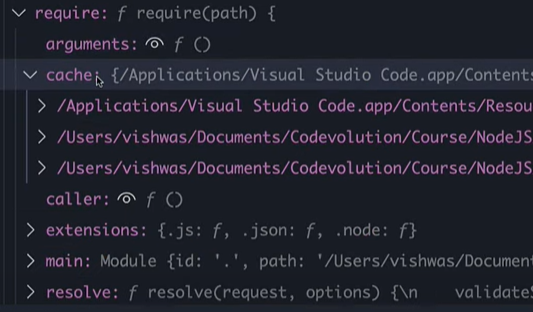
- Module Caching
When we require new module its
loaded and cached. this will reuse cached module on redeclaring same module.
// super-hero.js
class SuperHero {
    constructor(name) {
        this.name = name;
    }
    getName () {
       return this.name;
    }
    setName (val){
        this.name = val
    };

}
module.exports = new SuperHero('Batman');

// index.js
const superHero = require('./super-hero.js');
console.log(superHero.getName());
superHero.setName('Superman');
console.log(superHero.getName());
const superHero2 = require('./super-hero.js');
console.log(superHero2.getName())

// output
// Batman
// Superman
// Superman
- Module.exports VS Exports exports is referance module.exports
// math.js
// module.export
const add = (a,b)=>a + b;
const sub = (a,b)=>a - b;
module.exports = {
    add,
    sub
}
// export
// this will work
exports.add = (a,b)=>a + b;
exports.sub = (a,b)=>a - b;
// this will not work (redefining module object).
exports = {
    add,
    sub
}
- ES modules
- Node.js 14 and above support ES modules
- Instead of module.exports, we use the export keyword
- The export can be default or named
- We import the exported variable or functions using the import keyword
# Build-in
Modules that Node.s ships with also referred to core modules
- path
- events
- fs
- stream
- http
# Event module
An event is an action or an occurrence that has happend in our application that web can respond to
const EventEmitter = require('node:events');
const emitter =  new EventEmitter();
emitter.on('trigger-event',(arg1,arg2)=>{
    console.log('trigger-event called',arg1,arg2);
})
/*
emitter.off(eventName, listener)
emitter.on(eventName, listener)
emitter.once(eventName, listener)
emitter.prependListener(eventName, listener)
emitter.prependOnceListener(eventName, listener)
emitter.removeAllListeners([eventName])
emitter.removeListener(eventName, listener)
*/
emitter.emit('trigger-event','arg1','arg2');
# Extending from EventEmitter
// user.js
const EventEmitter = require('node:events');
class User extends EventEmitter {
    ....
    getOrder () {
        this.emit('order','arg1','arg2')
    }
}
// index.js
const userObj = new User();
userObj.on('order',(arg1,arg2)=>{ console.log('order triggered',arg1,arg2) });
# fs module
File system module
# Sync and Async file operation
const fs = require('node:fs');
// Sync
const fileContents = fs.readFileSync('./file.txt','utf-8');
fs.writeFileSync('./file.txt','Hello World');
// Async
fs.readFile('./file.txt','utf-8',(error, data)=>{
    console.log(error, data);
});
/**  fs.writeFileSync(<PATH>,<Contents>,<FLAGs>,()=>{}); */
fs.writeFileSync('./file.txt','Hello World',(err)=>{console.log(err)});
# Streams
A stream is a sequence of data that is being moved from one point to another over time.
const fs = require('node:fs');

const readableStream = fs.createReadStream('./file.txt',{
    encoding : 'utf-8',
    highWaterMark: 2 // send data in 2 chunks at time
})
const writeableStream = fs.createWriteStream('./file2.txt')
readableStream.on('data',(chunk)=>{
    writeableStream.write(chunk)
})
# Pipe
const fs = require('node:fs');
const zlib = require('node:zlib')
const gzip = zlib.createGzip()

const readableStream = fs.createReadStream('./file.txt',{
    encoding : 'utf-8',
    highWaterMark: 2 // send data in 2 chunks at time
})

readableStream.pipe(gzip).pipe(fs.WriteStream('./file2.txt.gz'));

const writeableStream = fs.createWriteStream('./file2.txt');
readableStream.pipe(writeableStream);
# Creating a node server
http moodule in-build
const http = require('node:http');
const server = http.createServer((req,res)=>{
    res.writeHead(200,{ "Content-Type": "text/plain"});
    res.end('hello world')
})
server.listen(3000,()=>{console.log('up and runing..')})
| Content-type | value |
|---|---|
| application/json | json |
| aapplication/pdf | |
| aapplication/zip | zip |
| text/plain | text |
| text/HTML | HTML |
# Libuv and Async methods
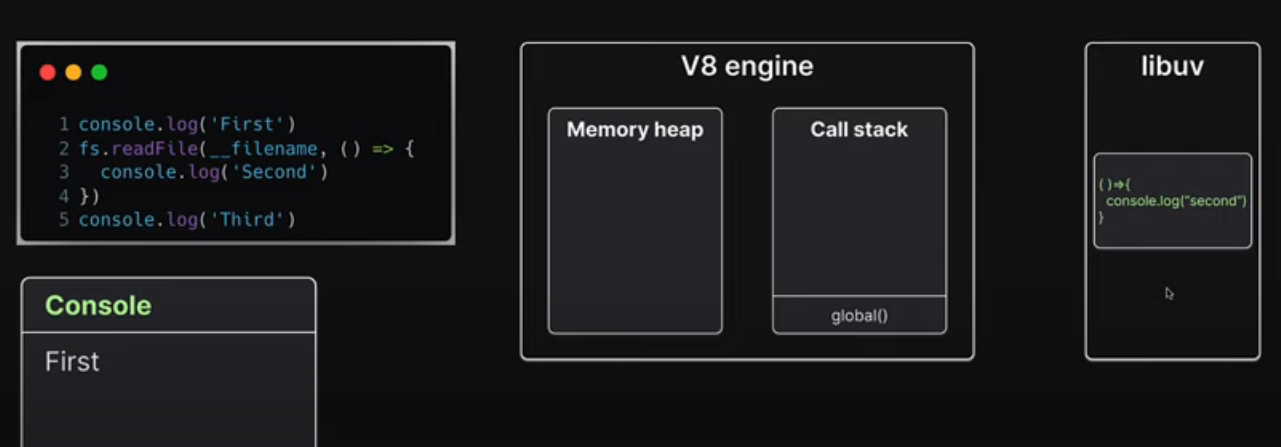
Async methods are handled by libuv
# Thread pool
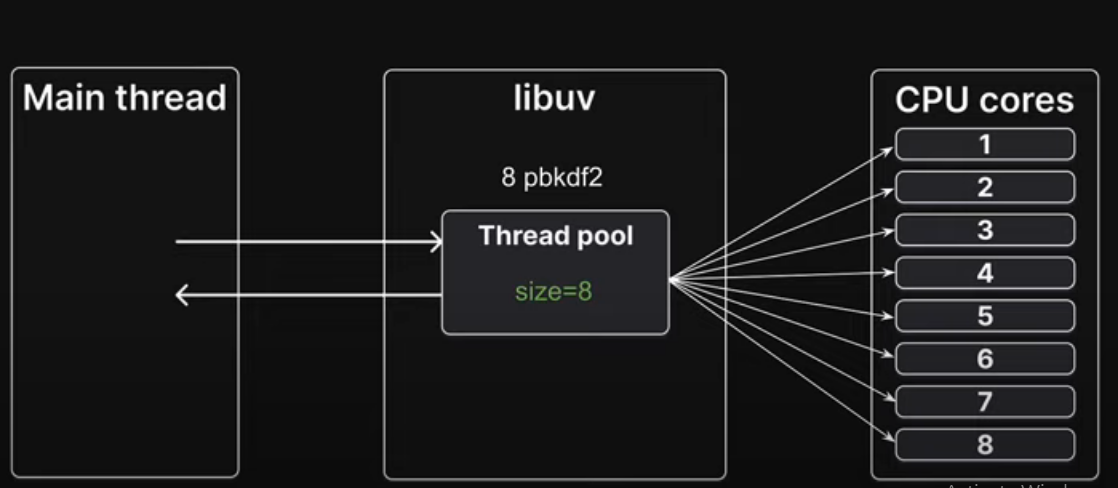 default 4 and update the size of pool use process env
process.env.UV_THREADPOOL_SIZE = 5
# Network I/O
- https.request is a network input/output operation and not a CPU bound operation it does not use thread pool
- Libuv instead delegates the work to OS kernel
# Cluster
Cluster master is controller of worker
const cluster = require('node:cluster');
const os = require('node:os');
console.log('CUPs', os.cpus().length)
if(cluster.isMaster){
    console.log('Master process '+ process.pid)
    cluster.fork();
    cluster.fork();
} else {
    console.log('Worker process '+ process.pid)
}
We should only create as many workers as there are CPU cores on machine
# Worker Threads Modules
- The worker_threads module enables the use of threads that execute javascript in parallel.
- Code executed in worker thread runs in a separate child process, preventing it from blocking your main application
- The cluster module can be used to run multiple instance of node.js that can distribute workloads
- worker_threads modules allows runing multiple application threads within a single node instance.
// index.js
const { Worker } = require('node:worker_threads');
const worker = new Worker('./worker-thread.js');
worker.on('message',()=>{
    // on event trigger do actions
})
// worker-thread.js
const { parentPort } =  require('node:worker_threads');
// time taking operations
parentPort.postMessage(arg)